The post How to Know If Your Website Redesign Was Worth It — Backed by Data appeared first on Ikonik Digital Agency | Digital Marketing & Web Development Agency | Jamaica.
]]>How to Measure the Success of Your Website Redesign
A website redesign offers an exciting opportunity to refresh your online presence, enhance the user experience, and ultimately drive better results. However, once the redesign is complete, how can you determine if it was truly successful? Measuring the success of a website redesign involves more than just admiring the new design—it requires tracking key metrics and analyzing user feedback to ensure that your updated website meets its objectives. This guide will help you evaluate the effectiveness of your website redesign.

1. Define Your Goals Before the Redesign
Why Setting Goals is Crucial
Before you can measure success, it’s essential to understand what you’re trying to achieve with your redesign. Having clearly defined goals will help you identify which metrics to track and evaluate. Common objectives for website redesigns include:
- Improving User Experience: Enhancing how users interact with the site.
- Increasing Conversions: Encouraging more visitors to take desired actions (e.g., signing up for newsletters, making a purchase).
- Reducing Bounce Rates: Encouraging users to engage with more pages rather than leaving quickly.
- Boosting Search Engine Rankings: Ensuring the website ranks higher for targeted keywords.
With these goals in mind, you can tailor your post-redesign measurements for maximum insight.

2. Key Metrics to Track After the Redesign
Bounce Rate: A Key Indicator of Engagement
Bounce rate refers to the percentage of visitors who leave your website after viewing only one page. A high bounce rate often signals problems with navigation, content relevancy, or slow loading speeds.
- Success Indicator: A well-designed website with improved navigation and engaging content should result in a lower bounce rate.
- Tools to Use: Google Analytics, Hotjar
Time on Page and Pages Per Session: Gauging User Engagement
These metrics tell you how long visitors stay on your website and how many pages they visit in a single session.
- Success Indicator: A user-friendly design and compelling content will increase both time on page and pages per session.
- Tools to Use: Google Analytics, Crazy Egg
Conversion Rate: The Bottom Line of Success
Conversions are the actions you want your users to take, such as completing a purchase or filling out a form. Whether it’s a lead generation form or a product sale, conversion rates are crucial in determining if the redesign has achieved its goals.
- Success Indicator: If your redesign focused on improving CTAs (calls-to-action) or simplifying the checkout process, you should see a higher conversion rate.
- Tools to Use: HubSpot, Google Analytics
Website Speed: Speed Matters
A slow-loading website can frustrate users and lead to high bounce rates. Plus, speed is a factor in search engine rankings.
- Success Indicator: The redesigned website loads faster, ideally within 2-3 seconds.
- Tools to Use: Google PageSpeed Insights, GTmetrix
Mobile Responsiveness: Optimizing for Mobile Traffic
In today’s digital world, mobile-first design is non-negotiable. Your website should work seamlessly across all devices to ensure a smooth user experience.
- Success Indicator: The redesigned site should have improved mobile metrics, including lower bounce rates and higher user engagement.
- Tools to Use: Google Mobile-Friendly Test, BrowserStack
Search Engine Rankings: Keep an Eye on SEO
Your redesign can impact SEO—both positively and negatively. It’s important to monitor keyword rankings to ensure your site maintains or improves its position in search engine results.
- Success Indicator: Improved rankings for targeted keywords and increased organic traffic.
- Tools to Use: SEMrush, Ahrefs, Google Search Console
User Feedback and Surveys: The Qualitative Side of Success
While data is critical, user feedback can provide valuable insights into how well your redesign meets your audience’s needs. Ask your users directly about their experience to gain deeper understanding.
- Success Indicator: Positive feedback about design appeal, ease of navigation, and functionality.
- How to Gather Feedback: Use tools like SurveyMonkey or integrate feedback forms into your website.
3. Compare Before-and-After Metrics
Why You Should Compare Your Pre- and Post-Redesign Data
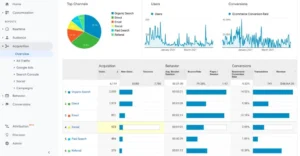
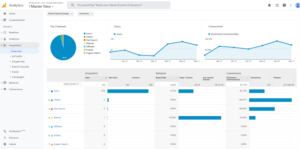
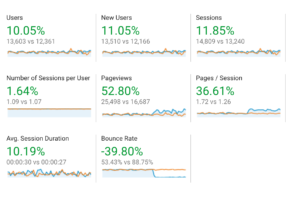
To evaluate the true success of your redesign, compare your key metrics from before and after the redesign. Analyzing trends over similar timeframes helps you identify if changes in traffic, engagement, or conversions are directly related to the redesign.
Example:
- Before Redesign: Bounce rate = 50%, Conversion rate = 2%
- After Redesign: Bounce rate = 35%, Conversion rate = 4%
These improvements show that the redesign positively impacted user behavior and engagement.
4. Monitor Heatmaps and User Behavior
Tracking User Interactions for Deeper Insights
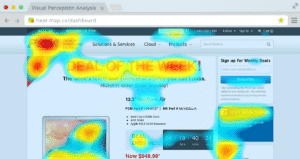
Heatmaps and session recordings provide a visual representation of how users engage with your website. These tools help you understand where users are clicking, how far they scroll, and where they may be getting stuck in the user flow.
- Success Indicator: Increased engagement with important elements like CTAs and improved navigation paths.
- Tools to Use: Hotjar, Crazy Egg
5. Track KPIs Over Time
Success Doesn’t Happen Overnight
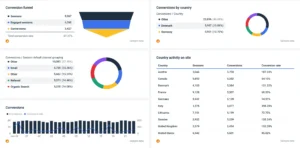
The impact of a website redesign isn’t always immediate. It’s essential to track your key performance indicators (KPIs) over the course of several months to spot long-term trends.
Examples of KPIs to Monitor:
- Lead generation rates
- Email sign-ups
- Customer retention rates
This data will give you a clearer picture of how your website continues to perform post-redesign.
6. Assess ROI: Is the Redesign Worth It?
Calculating the Return on Investment
A successful website redesign should generate a return on investment (ROI) that justifies the costs involved. To calculate ROI, compare the costs of the redesign with the additional value it generates.
ROI Formula:
ROI=(Net Profit from Redesign−Redesign CostsRedesign Costs)×100\text{ROI} = \left(\frac{\text{Net Profit from Redesign} – \text{Redesign Costs}}{\text{Redesign Costs}}\right) \times 100
For example, if your redesign cost $10,000 and resulted in $20,000 in additional revenue, your ROI would be 100%.
7. Common Redesign Pitfalls to Avoid
Watch Out for These Mistakes
Despite the best intentions, redesigns sometimes fall short of expectations. Be aware of these common pitfalls:
- SEO Issues: Losing search rankings due to poorly managed URL changes or neglected metadata.
- User Confusion: Introducing overly complex design changes that confuse users.
- Ignored Analytics: Failing to review pre-redesign data, which can provide valuable guidance.
By being aware of these potential issues, you can take steps to avoid them and ensure a smoother redesign process.

Final Thoughts: Measuring Redesign Success with Data
A website redesign represents a significant investment, and it’s essential to measure its success effectively. By tracking key metrics like bounce rates, conversions, and user feedback, you can assess whether your redesign achieved its intended goals and created tangible value for your business.
Looking to redesign your website with measurable results in mind? Contact Ikonik Digital today at [email protected] for a consultation and let’s create a website that delivers on every metric!
The post How to Know If Your Website Redesign Was Worth It — Backed by Data appeared first on Ikonik Digital Agency | Digital Marketing & Web Development Agency | Jamaica.
]]>The post Write Website Content That Converts — Unlock 3x More Leads Starting Today appeared first on Ikonik Digital Agency | Digital Marketing & Web Development Agency | Jamaica.
]]>
How to Write Website Content That Converts: A Guide for Business Owners
When it comes to your website, the content isn’t just there to fill space—it’s a powerful tool that can turn casual visitors into loyal customers or leads. Whether you’re selling a product, generating leads, or promoting a service, effective copywriting is key. The right words can build trust, spark interest, and motivate action.
But how do you write website content that actually drives results? This post will break down essential copywriting best practices to help you craft content that converts. We’ll focus on two key elements: crafting powerful headlines and writing call-to-action (CTA) copy that motivates your visitors to act.
Why Website Content Matters for Conversions
Before diving into the best practices, it’s important to understand why content plays such a crucial role in driving conversions.
Your website is often your first impression on potential customers. Visitors decide within seconds whether they want to stay or leave. So, your content needs to grab their attention immediately and encourage them to explore further. If your messaging is unclear, or if it doesn’t resonate with their needs, they’ll hit the back button faster than you can blink.
On the flip side, good website content builds trust, answers questions, and guides users toward taking the actions you want. Whether it’s signing up for a newsletter, making a purchase, or filling out a contact form, well-written content helps them make informed decisions.
Let’s dive into some practical tips for writing content that converts!
1. Craft Headlines That Demand Attention
Your headline is the first thing visitors see when they land on your site. It’s your hook—the thing that entices them to stick around and explore more. A compelling headline does more than just convey what the page is about; it captures attention, generates curiosity, and promises value.
Best Practices for Crafting Headlines:
1. Be Clear, Not Clever
Avoid ambiguity. Your visitors are not there to decode your message. Instead of trying to be overly clever or witty, focus on clarity. Use words that clearly convey what’s in it for the visitor.
Example:
- Instead of: “A Better Way to Grow Your Business”
- Try: “Increase Your Sales by 20% in Just 3 Months”
2. Use Numbers & Data
Headlines with numbers (like statistics, percentages, or years) instantly catch attention. They create a sense of credibility and make your offering seem more concrete.
Examples:
- 5 Proven Strategies to Boost Your Website Traffic
- “How We Helped 100+ Businesses Double Their Revenue”
3. Highlight Benefits
Remember, visitors care about what benefits they’ll gain, not just the features of your product or service. Your headline should promise a solution to a problem they’re facing.
Example:
- Instead of: “We Offer Website Design Services
- Try: “Transform Your Website into a Lead-Generating Machine”
4. Ask Engaging Questions
Asking a question piques curiosity and addresses the visitor’s needs directly.
Examples:
- “Ready to Grow Your Business Online?
- “Want to Get More Leads from Your Website?”
2. Write Effective Copy That Connects with Your Audience
Once you’ve captured attention with a powerful headline, it’s time to nurture that interest with well-crafted body copy. Your content should speak directly to your audience’s pain points, provide solutions, and build trust.
Best Practices for Writing Conversion-Focused Copy:
1. Speak Directly to Your Audience
Using second-person pronouns (“you,” “your”) makes your content feel personal and relevant. It directly engages the reader and shows that you understand their needs.
Example:
- You need a website that converts visitors into leads.
- Instead of: “Our websites convert visitors into leads.”
2. Be Benefits-Driven, Not Feature-Driven
Rather than focusing on what your product or service does, explain why it matters to the visitor. Benefits highlight the outcomes, while features describe the process or tool.
Example:
- Feature: “Our SEO service increases your website’s ranking.”
- Benefit: “Get more traffic and higher visibility on Google—leading to more sales!”
3. Use Social Proof
Adding testimonials, case studies, or client reviews helps establish trust. People are more likely to convert when they see that others have had positive experiences with your product or service.
Example:
- “Over 1,000 businesses trust us to improve their online presence. Here’s what our clients have to say…”
4. Break Up Your Content
Make your copy scannable by using short paragraphs, bullet points, and subheadings. Remember, people often skim content, so making it easy to digest is key.
Example:
- Short, punchy sentences
- Bullet points for key benefits
- Clear subheadings for each section of the page
3. Create Clear, Compelling Calls-to-Action (CTAs)
The ultimate goal of your website content is to get visitors to take action—whether that’s signing up for a free trial, downloading a guide, or making a purchase. This is where your call-to-action (CTA) comes in. A strong CTA directs your visitor toward the next step.
Best Practices for Writing CTAs:
1. Use Action-Oriented Language
Your CTA should be a direct command that motivates the user to act. Use strong verbs like “Get,” “Download,” “Start,” “Claim,” or “Subscribe.”
Examples:
- “Get Started Today”
- “Download Your Free Guide”
- “Claim Your 30% Discount”
2. Create Urgency
A sense of urgency can encourage immediate action. Phrases like “limited time,” “last chance,” or “offer expires soon” can prompt visitors to act faster.
Example:
- “Sign up before midnight and get an extra 10% off!”
3. Make It Visually Stand Out
Your CTA should be easy to find. Use contrasting colors, larger buttons, and ample white space around the CTA to make it pop.
4. Be Clear About What Happens Next
Ensure your CTA clearly tells visitors what to expect after they click. Will they receive a free ebook? Exclusive access? Let them know.
Example:
- “Subscribe Now for Instant Access to Our Free Resources”
4. Test and Refine Your Content for Better Results
Creating content that converts isn’t a one-and-done task. It’s an ongoing process. To ensure your copy is truly effective, you need to test, measure, and refine it regularly.
A/B Testing
Test different versions of your headlines, CTAs, and even content layout. A/B testing helps you identify which elements drive the most conversions.
Use Analytics
Track key metrics such as bounce rates, conversion rates, and time spent on page. These insights will tell you how well your content is performing and where improvements are needed.
Conclusion: Write Website Content That Drives Action
Writing website content that converts is all about understanding your audience and guiding them toward a desired action. Every element of your website copy, from your headline to your CTA, should be designed to motivate your visitors to take the next step.
By focusing on clear messaging, benefits-driven copy, and strong CTAs, you can create a website that not only attracts visitors but converts them into paying customers or valuable leads.
At Ikonik Digital, we specialize in creating conversion-focused website copy that helps businesses achieve their goals. If you’re ready to optimize your website content and increase conversions, contact us today for expert advice and copywriting services!
Ready to Transform Your Website?
Reach out to Ikonik Digital at [email protected] for personalized content strategies, website audits, and copywriting services tailored to your business goals. Let’s turn your website into a powerful conversion tool!
The post Write Website Content That Converts — Unlock 3x More Leads Starting Today appeared first on Ikonik Digital Agency | Digital Marketing & Web Development Agency | Jamaica.
]]>The post Voice Search Optimization: How to Capture 50% More Traffic with These SEO Tools appeared first on Ikonik Digital Agency | Digital Marketing & Web Development Agency | Jamaica.
]]>Voice Search Optimization: The Key to Staying Competitive in 2025
As virtual assistants like Siri, Alexa, and Google Assistant continue to rise in popularity, businesses must adapt their digital marketing strategies to accommodate this shift in user behavior. Voice search is no longer just a convenience; it has become an integral part of how users search for information, make purchases, and interact with websites.
According to recent studies, nearly 50% of all searches are expected to be voice searches by 2025. This makes voice search optimization a critical element of your SEO strategy moving forward. In this blog post, we’ll explore the tools and techniques you can use to optimize your website for voice search, helping you stay ahead of the competition while providing a seamless user experience.
Why Voice Search Optimization Matters
Voice search differs significantly from traditional typed searches, influencing how content is indexed and ranked. Voice queries are typically longer, more conversational, and natural, while traditional searches are often shorter and more specific.
For instance, someone might type, “Best pizza restaurant Ocho Rios,” but ask their voice assistant, “Where can I find the best pizza near me?” This shift in query structure requires you to adjust your SEO strategy to ensure your website ranks well for conversational, long-tail phrases.
Key Voice Search Trends for 2025
- Conversational Queries: Voice searches often contain question words like “who,” “what,” “where,” “how,” and “why.”
- Local Intent: A significant portion of voice searches targets local businesses with phrases like “near me” or “close to me.”
- Mobile Dominance: Most voice searches occur on mobile devices, making mobile optimization essential.
1. Focus on Natural Language and Conversational Phrases
Since voice searches are conversational, your content must reflect this shift. Embracing natural language and long-tail keywords will help your site align with voice search queries.
Techniques to Use:
- Use Question Formats: Integrate common questions your target audience might ask. For example, a dentist could target, “How can I prevent tooth decay?” or “What are the symptoms of gum disease?”
- Include Long-Tail Keywords: Voice searches often use longer phrases. For instance, instead of optimizing for “pizza restaurant Ocho Rios,” target phrases like “Where can I get the best pizza near me in Ocho Rios?”
- Write Conversationally: Use simple, clear, and concise language that mimics natural speech patterns.
Example:
Instead of optimizing for “weather forecast,” use “What’s the weather like today in Ocho Rios?”
2. Optimize for Local Search
Voice search users often look for local information. In fact, 46% of voice searches have local intent. Optimizing your website for local search results is crucial for businesses serving specific areas.
Techniques to Use:
- Claim Your Google My Business Listing: Ensure your business name, address, and phone number (NAP) are accurate and consistent across all platforms.
- Use Localized Keywords: Incorporate city or neighborhood names into your content, meta descriptions, and title tags. For instance, “Best Italian restaurant in Ocho Rios.”
- Optimize for “Near Me” Searches: Include location-based keywords in your copy and metadata to capture these queries.
Example:
A gym could optimize for “Best gym near me” or “Top-rated gym in Ocho Rios.”
3. Improve Website Speed and Mobile Optimization
Voice searches are predominantly mobile. Ensuring your website is mobile-friendly and loads quickly is vital for ranking well.
Techniques to Use:
- Implement AMP (Accelerated Mobile Pages): AMP helps web pages load faster on mobile devices, reducing bounce rates and improving user experience.
- Optimize for Mobile-First Design: Use responsive design to ensure your site is easy to navigate on any screen size.
- Speed Optimization Tools: Utilize tools like Google PageSpeed Insights to identify and fix performance issues. Compress images, enable browser caching, and minimize redirects to improve load times.
4. Feature Structured Data and Schema Markup
Structured data helps search engines understand your content, making it easier to generate rich snippets and voice-activated responses.
Techniques to Use:
- Use Schema Markup: Implement Schema.org markup to provide search engines with contextual information about your content.
- Answer Common Questions with FAQ Pages: Create a FAQ section and mark it up with structured data. This increases the likelihood of your content appearing in voice search results.
Example:
A restaurant could use structured data to display its hours, location, and menu directly in search results, simplifying the user’s search experience.
5. Focus on Featured Snippets
Featured snippets often provide voice search responses. Appearing in this “Position Zero” can significantly boost your website’s visibility.
Techniques to Use:
- Provide Direct Answers: Answer questions concisely at the beginning of your content.
- Use Bullet Points or Lists: Break down information into easily digestible formats that can be converted into voice responses.
- Optimize for Position Zero: Structure your content to address question-based queries clearly and succinctly.
6. Optimize for Conversational Voice Assistants
Different voice assistants prioritize different content. Tailor your optimization efforts to the devices your audience uses most.
Techniques to Use:
- Target Voice Queries on Popular Devices: Research the devices and platforms your audience uses and optimize accordingly.
- Leverage Local Directories: Get listed on platforms like Yelp and TripAdvisor, which are often integrated with voice assistants.
Preparing for the Future of Voice Search
Voice search optimization is no longer optional in 2025—it’s essential for staying competitive in the digital landscape. By focusing on natural language, local search, mobile optimization, and structured data, you can make your website voice search-friendly and ready for the next generation of user interactions.
At Ikonik Digital, we specialize in helping businesses like yours stay ahead of digital trends, including voice search optimization. Ready to improve your website’s SEO and drive more organic traffic? Contact us today at [email protected] for a consultation!
Let’s shape the future of your business together.
The post Voice Search Optimization: How to Capture 50% More Traffic with These SEO Tools appeared first on Ikonik Digital Agency | Digital Marketing & Web Development Agency | Jamaica.
]]>The post 5 Critical Website Navigation Fixes That Boost Usability and Slash Bounce Rates Now appeared first on Ikonik Digital Agency | Digital Marketing & Web Development Agency | Jamaica.
]]>How to Improve Website Navigation for a Seamless User Experience
Website navigation is one of the most critical aspects of user experience (UX). How users interact with your website determines whether they stay, explore, or leave. If your navigation is confusing, cluttered, or difficult to use, you risk losing potential customers and reducing conversions. On the other hand, a seamless, intuitive navigation system enhances user experience, boosts engagement, and encourages visitors to explore your site further.
In this blog post, we’ll explore five key factors to help you improve website navigation. By implementing these tips, you can create a positive experience that keeps visitors coming back.
1. Simplify Your Menu Structure
A clean, simple, and well-organized navigation menu is essential for a good user experience. Overcrowded or complicated menus overwhelm visitors, making it difficult for them to find what they need quickly. Simplifying your navigation allows users to move through your site with ease, reducing frustration and improving overall satisfaction.
Best Practices:
- Limit the number of menu items: Keep your main navigation bar to a maximum of 7 menu items. Anything more can make the menu feel cluttered.
- Use clear and concise labels: Avoid jargon and use simple, easy-to-understand words for your menu items. For example, instead of “Solutions,” use “Services.”
- Prioritize important pages: Place your most important pages, such as Home, About, Services, and Contact, at the top or in the most prominent positions in your menu.
Example:
For an e-commerce website, your menu could include sections like:
- Home
- Shop
- Categories (e.g., Men, Women, Accessories)
- About Us
- Blog
- Contact Us
This streamlined approach makes it easy for users to find products, company information, and customer service.
2. Make Navigation Responsive
In today’s mobile-first world, your website’s navigation must work just as well on mobile devices as on desktops. Responsive design ensures your navigation adjusts seamlessly to various screen sizes, providing an optimal experience across all devices.
Best Practices:
- Use a hamburger menu for mobile: The hamburger icon (three stacked lines) is a widely recognized symbol for mobile menus. It saves space while giving users easy access to your site’s main sections.
- Keep key actions easily accessible: Ensure critical actions (like the shopping cart, search bar, and contact button) are visible and easy to tap on smaller screens.
Example:
When users visit your website on mobile, the menu could collapse into a hamburger icon. When clicked, it expands into a full navigation menu that’s easy to scroll through and tap on.
3. Use Descriptive Links and Labels
Navigation links should clearly indicate where they lead. Vague labels can confuse visitors, making them hesitant to click. Descriptive, intuitive labels guide users to the right content quickly, improving the overall experience and reducing bounce rates.
Best Practices:
- Be specific with your language: Use labels like “Our Services” or “Explore Our Portfolio” instead of general terms like “Click Here.”
- Use action words: Verbs like “Shop,” “Discover,” and “Learn” prompt users to take action.
- Avoid internal jargon: Use terminology your audience understands. If technical terms are necessary, provide a glossary or simpler alternative.
Example:
For a financial services website, instead of using a vague label like “Resources,” use “Retirement Planning” or “Tax Tips.”
4. Optimize Search Functionality
An effective search bar is one of the most powerful tools for improving website navigation. Users often prefer search when they’re looking for something specific and don’t want to waste time navigating through multiple pages. A good search feature lets users quickly locate what they need without frustration.
Best Practices:
- Make the search bar visible: Place it in an accessible location, such as the top of the page or in the header.
- Use autosuggest or autocomplete: Show suggestions as users type to help them find relevant content faster.
- Offer filters: On e-commerce websites, filters can narrow search results by categories, price range, or other criteria.
Example:
An e-commerce site’s search bar could suggest popular products and categories. For instance, typing “women’s shoes” might bring up categories like “high heels” or “sandals.”
5. Improve Website Load Speed
Website load speed significantly impacts navigation and user experience. Slow websites lead to higher bounce rates, as users are unlikely to stay if a page takes too long to load. A fast-loading site encourages visitors to explore more and interact with your content.
Best Practices:
- Optimize images and media files: Compress and resize images to reduce load times without sacrificing quality. Use modern file formats like WebP.
- Minimize HTTP requests: Reduce the number of elements (scripts, stylesheets, images) that need to load on each page.
- Leverage browser caching: Store assets locally so repeat visitors don’t need to reload everything from scratch.
Example:
Use tools like Google PageSpeed Insights or GTmetrix to analyze your site’s speed and get suggestions for improvement. If your site takes more than 3 seconds to load, it’s time to optimize.
Conclusion: A Better Navigation Experience Leads to Better Results
Improving website navigation isn’t just about aesthetics. It’s about creating a seamless, enjoyable experience that helps users find what they need quickly and easily. By simplifying your menu, making it mobile-friendly, using clear and descriptive labels, optimizing search functionality, and improving load times, you can enhance usability and keep visitors engaged.
When you prioritize user experience, you’re not only improving your website’s usability but also boosting conversion rates, engagement metrics, and overall customer satisfaction.
Ready to Take Your Website Navigation to the Next Level?
At Ikonik Digital, we specialize in web design and development focused on usability, user experience, and responsive navigation. Whether you need a complete website redesign or improvements to your current navigation structure, we’re here to help!
Contact us at [email protected] to discuss how we can enhance your website’s navigation and create a seamless user experience that drives results.
The post 5 Critical Website Navigation Fixes That Boost Usability and Slash Bounce Rates Now appeared first on Ikonik Digital Agency | Digital Marketing & Web Development Agency | Jamaica.
]]>The post The Hard Truth: Why Responsive Web Design Is Critical to Avoid Losing 70% of Mobile Traffic appeared first on Ikonik Digital Agency | Digital Marketing & Web Development Agency | Jamaica.
]]>The Importance of Responsive Web Design in 2025: Why Your Business Can’t Afford to Ignore It
In today’s digital age, your website is often the first point of contact between your business and potential customers. As mobile usage continues to grow, your website must be optimized to provide a seamless experience on all devices. In 2025, responsive web design (RWD) is no longer just a “nice-to-have” feature—it’s an essential aspect of your online presence. In this blog post, we’ll explore why responsive web design is critical for success in 2025, user behavior trends, the impact on SEO, and the business benefits of a mobile-friendly website.
What Is Responsive Web Design?
Responsive web design refers to a design approach that ensures your website adapts to different screen sizes and devices. Whether your visitors are on a smartphone, tablet, or desktop computer, responsive design allows the layout, images, and functionality of your site to adjust for an optimal user experience.
In the past, it was common for websites to have separate desktop and mobile versions. However, this approach has become outdated. Today, responsive web design ensures that a single website works seamlessly across a wide range of devices. It’s about creating a website that not only looks good but also functions smoothly on every screen size, making it user-friendly for everyone.
The Rise of Mobile Devices: Changing User Behavior
The shift toward mobile usage is undeniable. According to recent data from Statista, as of 2024, mobile devices account for approximately 60-70% of global internet traffic. This growing trend shows no signs of slowing down, and it has transformed the way people interact with websites.
The Mobile-First Mentality
More users are browsing the web on mobile phones than desktop computers. In fact, Google has reported that over 50% of global search queries now come from mobile devices. This change has led to a shift in how we think about web design. Websites that are not optimized for mobile devices risk alienating a large portion of their audience, leading to higher bounce rates and missed opportunities.
User Expectations in 2025
Today’s consumers expect websites to load quickly and display correctly on mobile devices. If your website takes too long to load or doesn’t function well on a smartphone, users are likely to leave. According to a study by Google, 53% of mobile users abandon a website if it takes longer than three seconds to load. A slow, poorly optimized site can significantly impact user engagement, customer satisfaction, and even your revenue.
Google Ranking Factors: Mobile-First Indexing
Google has long prioritized mobile-friendly websites in search rankings. But in recent years, the search giant has taken it a step further by implementing mobile-first indexing. This means that Google primarily uses the mobile version of a website to index and rank pages, rather than the desktop version.
Why Google Prioritizes Mobile-Optimized Websites
Google’s goal is to provide the best user experience possible, and mobile-friendly websites align with this mission. Sites that load quickly and provide easy navigation on mobile devices improve the overall user experience, which is why Google rewards them with higher search rankings.
- Better User Experience: Websites that are responsive tend to load faster, offer smoother navigation, and display content properly on all devices, resulting in better user satisfaction.
- Lower Bounce Rates: Non-responsive websites tend to have higher bounce rates. If users leave your site because it’s difficult to navigate or doesn’t load properly on their device, Google interprets this as a negative signal, which can affect your rankings.
- Mobile-First Content: If your website isn’t optimized for mobile, your content might not be easily accessible on mobile devices. Google wants to ensure that content is equally accessible and readable across all platforms, which is why mobile-optimized sites rank higher.
The Business Impact of a Non-Responsive Website
A website that’s not optimized for mobile can negatively affect your business in several ways. Let’s take a closer look at the potential consequences of having a non-responsive website in 2025.
1. Decreased Traffic and Visibility
Websites that are mobile-friendly tend to rank higher on Google. As Google continues to prioritize mobile-optimized websites, a responsive site helps you capture valuable organic traffic and ensures that you don’t miss out on potential customers. Non-responsive sites, on the other hand, risk losing visibility in search results, particularly as mobile-first indexing becomes the norm.
2. Lower Conversion Rates
Your website’s main goal is to convert visitors into leads or customers. A non-responsive site can make this difficult, especially for mobile users. A responsive design ensures that your visitors can easily navigate your site, fill out forms, make purchases, and complete other actions—all regardless of the device they’re using. This can significantly improve your conversion rates and, ultimately, your bottom line.
3. Damaged Customer Trust
First impressions matter. If a potential customer lands on your site and it’s difficult to use, they are less likely to trust your business. A non-responsive website can make your brand seem outdated or unprofessional. In contrast, a responsive design creates a clean, modern look that helps build trust with visitors. Providing a seamless experience across all devices fosters confidence and encourages customers to take the next step in their buying journey.
4. Falling Behind Competitors
Your competitors are likely investing in responsive web design. If you don’t, they’ll have the edge when it comes to search rankings, user experience, and customer engagement. To stay competitive in today’s mobile-first world, it’s essential to prioritize responsive web design. Investing in a mobile-optimized website now can help you stay ahead of the curve and maintain a strong online presence.
Best Practices for Responsive Web Design in 2025
To ensure your website is fully responsive and optimized for all devices, here are some best practices to follow:
1. Start with a Mobile-First Approach
When designing your website, prioritize the mobile experience first. Mobile-first design ensures that the most essential features and content are easily accessible on smaller screens. Once you’ve optimized for mobile, you can expand the design to suit larger screens.
2. Use Flexible Layouts
Responsive web design relies on flexible layouts that adjust based on screen size. By using flexible grids and layouts, you ensure that your content remains well-organized and readable across various devices. This approach also allows your website to adapt to different screen orientations and resolutions.
3. Optimize for Speed
Page load times are critical, especially on mobile devices. Slow-loading websites not only frustrate users but also impact your search rankings. Optimize images, reduce file sizes, and streamline your code to improve load times. A fast website ensures that visitors have a positive experience, regardless of their device.
4. Design for Touchscreens
Many mobile users interact with websites using touch gestures. To ensure your website is touchscreen-friendly, make sure buttons and links are large enough to tap comfortably. Avoid using small text or overly complex navigation that can be difficult to use on a mobile device.
5. Test Across Devices
It’s important to regularly test your website on a variety of devices to ensure that it looks good and functions properly on different screen sizes and operating systems. Testing helps you identify and fix any issues that may arise, ensuring a consistent user experience across all platforms.
Conclusion: Responsive Design Is Crucial for Success
In 2025, responsive web design is more important than ever. With mobile usage on the rise and Google’s mobile-first indexing influencing search rankings, businesses can no longer afford to ignore mobile optimization. A responsive website not only enhances the user experience but also improves your SEO rankings, boosts conversions, and builds trust with your audience.
If your website isn’t yet mobile-friendly, now is the time to make the change. At Ikonik Digital, we specialize in creating websites that are optimized for all devices. Contact us today at [email protected] to discuss how we can help you build a responsive, mobile-friendly website that drives traffic and helps your business thrive in 2025 and beyond.
By following these guidelines and adopting a responsive web design approach, you ensure that your business stays competitive and accessible to users, no matter what device they’re using.
The post The Hard Truth: Why Responsive Web Design Is Critical to Avoid Losing 70% of Mobile Traffic appeared first on Ikonik Digital Agency | Digital Marketing & Web Development Agency | Jamaica.
]]>The post Boost Conversions by 35%: Why User-Centered Design Is Your Web Development Game-Changer appeared first on Ikonik Digital Agency | Digital Marketing & Web Development Agency | Jamaica.
]]>The Power of User-Centered Design in Boosting Conversions
In today’s digital world, a website isn’t just a pretty face. It’s a vital tool for attracting visitors, keeping them engaged, and guiding them toward meaningful actions like making a purchase, signing up for a newsletter, or contacting you for more information. Achieving this, however, requires more than just a sleek design or fast load times. It demands a deep understanding of User-Centered Design (UCD).
What is User-Centered Design?
User-Centered Design is an approach that focuses on the needs, behaviors, and expectations of users throughout the web development process. Instead of building a website based solely on internal goals or assumptions, UCD involves putting your users’ needs first. It means designing your website in a way that enhances their experience while achieving your business objectives.
UCD involves:
- Researching user needs through surveys, interviews, and analytics.
- Designing based on real user feedback and testing.
- Iterating and improving based on user data and performance.
- Ensuring accessibility and inclusivity for a wide range of users.
When you invest time in understanding your audience, you can create a website that’s not only functional but also a pleasure to use. This helps in building lasting connections with your audience and, most importantly, improving conversions.
Why User-Centered Design is Crucial for Boosting Conversions
1. A Better User Experience Leads to Higher Engagement
The first step in any successful conversion strategy is to ensure your website is easy to use. When visitors can quickly find what they need, whether it’s a product, a service, or vital information, they’re more likely to stay on your site longer. Longer engagement equals more opportunities for conversions.
For instance:
- Clear Navigation: Easy-to-understand menus and site structure help users navigate without frustration.
- Readable Content: Proper contrast, legible fonts, and concise content ensure visitors can make quick decisions without feeling overwhelmed.
By designing your site with your users in mind, you make it easier for them to interact with your content, leading to more meaningful engagements.
2. Aligning with User Intent Drives Conversion Opportunities
Understanding your users’ intent is key to designing a site that drives conversions. By identifying what your visitors want to achieve, you can craft conversion funnels that guide them toward their desired outcomes, such as making a purchase or signing up for your newsletter.
Consider this example:
- E-commerce Websites: Knowing that users want to buy, you can streamline the checkout process and offer incentives (discounts or free shipping) at critical points.
- Service-based Websites: If your users seek trust and transparency, position testimonials, case studies, and contact forms in prominent spots to increase conversions.
The better you understand your users’ goals, the more you can tailor your website to guide them seamlessly toward action.
3. Increased Trust and Credibility Lead to Higher Conversions
A website designed with the user in mind not only serves their needs but also builds trust. When users feel that your site respects their time and needs, they’re more likely to take action—whether that’s buying a product, submitting a form, or subscribing to a service.
Key trust-building elements include:
- Clear Calls to Action (CTAs): Bold, visible CTAs make it easy for users to know what to do next.
- Testimonials & Reviews: Customer feedback adds credibility and reinforces trust in your brand.
- Secure Payment Methods: Offering secure payment options ensures users feel safe making transactions.
When your website is designed to provide users with everything they need in a simple, secure, and trustworthy manner, they’re more likely to convert.
4. Mobile-First Design for Optimal User Experience and Conversions
Did you know that more than half of all website traffic now comes from mobile devices? That’s why mobile-first design is not just an option, it’s essential for improving both user experience and conversion rates.
User-Centered Design focuses on making websites mobile-friendly, which is crucial for creating an enjoyable browsing experience. Here’s how to ensure your site performs well on mobile:
- Responsive Layouts: Your site should seamlessly adapt to any screen size.
- Optimized Forms: Forms should be easy to complete on small screens.
- Speed: Mobile users often have slower internet connections, so your site must load quickly.
By prioritizing mobile optimization, you reduce bounce rates and enhance the likelihood of users completing desired actions, regardless of the device they’re using.
The Role of User Research in User-Centered Design
User-Centered Design isn’t a one-time process—it’s an ongoing effort. Regular user research and testing are essential for refining your website over time. Gathering feedback through surveys, analytics, heatmaps, and A/B testing allows you to continuously improve the user experience and better align your website with their needs.
Here’s how to gather valuable user feedback:
- Surveys and Interviews: Directly ask your users what they need and what frustrates them.
- Heatmaps and Analytics: These tools help you understand user behavior and identify areas for improvement.
- A/B Testing: Experiment with different page variations to see which one performs better in terms of user engagement and conversions.
This ongoing research ensures that your website evolves as your audience’s preferences change, keeping it fresh, relevant, and conversion-friendly.
Conclusion: Why Prioritizing User Needs Is Key to Conversion Success
In today’s competitive digital environment, businesses must prioritize User-Centered Design to stand out. By understanding your users’ behaviors, needs, and pain points, you can create a website that’s not only visually appealing but also easy to use and conversion-friendly. This results in a better overall user experience, higher engagement, and ultimately, more conversions.
At Ikonik Digital, we specialize in designing websites that put user needs first. Our approach focuses on creating intuitive, engaging websites that help businesses meet their conversion goals. Whether you’re looking for a redesign, new features, or a fresh UX strategy, we’re here to help bring your vision to life while keeping your users at the center of it all.
Contact us today at [email protected] to discuss how we can help you optimize your website and boost your conversions with a user-centered design.
The post Boost Conversions by 35%: Why User-Centered Design Is Your Web Development Game-Changer appeared first on Ikonik Digital Agency | Digital Marketing & Web Development Agency | Jamaica.
]]>The post 5 Critical Website Elements That Build Trust and Drive Sales — Implement Them Now appeared first on Ikonik Digital Agency | Digital Marketing & Web Development Agency | Jamaica.
]]>5 Essential Website Features to Build Trust and Boost Conversions
As a business owner or corporate executive, you know that trust is the foundation of any successful relationship. Whether you’re managing an e-commerce store, a service-based business, or a personal brand, building trust with your website visitors is critical. A website is often the first interaction a customer has with your brand, and a well-designed, user-friendly site can help transform visitors into loyal customers. But what specific features should you focus on to foster trust?
In this post, we’ll cover five key features that can significantly increase the credibility of your website. These include customer reviews, certifications, professional design, security measures, and clear contact information. By focusing on these areas, you can create a trustworthy online presence that boosts customer confidence and drives conversions.
1. Customer Reviews and Testimonials: The Power of Social Proof
Why They Matter
One of the most effective ways to build trust is through social proof. Customer reviews and testimonials provide real-time validation of your products or services. According to BrightLocal, 79% of consumers trust online reviews as much as personal recommendations. When visitors see that others have had positive experiences with your business, it reinforces the idea that your company is reliable and delivers quality.
How to Incorporate Reviews
To make the most of customer reviews, consider implementing the following strategies:
- Product/Service Pages: Display customer reviews directly on relevant product or service pages. This provides potential buyers with immediate feedback and reinforces their decision to make a purchase.
- Dedicated Testimonial Page: Create a separate page on your site that showcases detailed customer stories, case studies, and before-and-after images. Highlight how your product or service has made a difference in your customers’ lives.
- Third-Party Platforms: If you have strong reviews on trusted platforms such as Google, Trustpilot, or Yelp, consider integrating these into your site. This lends additional credibility by showing that your reputation extends beyond your website.
The more authentic and transparent your reviews are, the more trust you will build with your audience. Encourage satisfied customers to leave reviews by sending out follow-up emails after a transaction or making it easy for them to submit feedback on your site.
2. Industry Certifications and Badges: Reassuring Your Customers
Why They Matter
Industry certifications and badges signal that your business adheres to established standards, whether they relate to security, quality control, or industry best practices. Certifications provide a layer of trust and authority that reassures visitors that they are engaging with a legitimate and professional business.
How to Incorporate Certifications and Badges
Here are a few ways to prominently display your certifications:
- Display Certifications Prominently: Place key certifications such as SSL (Secure Socket Layer) encryption, ISO certifications, or any industry-specific badges (e.g., Google Partner, BBB accreditation) in visible locations on your homepage, product pages, or during the checkout process.
- Explain Their Significance: Include brief descriptions of what each certification or badge represents. This helps visitors understand why it matters and how it benefits them.
By showcasing certifications, you’re not just displaying credentials—you’re offering additional assurances that your business is committed to quality, safety, and compliance.
3. Professional Design and User Experience: First Impressions Matter
Why It Matters
The design and usability of your website play a significant role in establishing trust. A clean, modern, and user-friendly design shows that you care about your brand and your customers’ experience. A website that looks outdated or is difficult to navigate can send the wrong message and make visitors hesitant to engage with your business.
How to Achieve a Professional Design
Here are some tips for creating a website design that inspires trust:
- Clean and Modern Layout: Keep your layout simple and intuitive. Organize content logically, with clear navigation and minimal clutter. Use typography, color schemes, and spacing that create a cohesive and aesthetically pleasing design.
- Responsive Design: In today’s mobile-first world, ensure your website is responsive. A mobile-friendly website not only improves user experience but also positively impacts your SEO rankings.
- Consistent Branding: Maintain consistency in your branding across your website. Use the same fonts, colors, and imagery that reflect your brand identity. This helps visitors recognize your brand and creates a sense of professionalism.
A polished and well-organized website gives the impression that you take your business seriously, and it instills confidence in your visitors.
4. SSL Encryption and Security Features: Protecting Customer Data
Why It Matters
In an era where online security threats are increasingly common, ensuring that your website is secure is non-negotiable. Without proper security measures, such as SSL encryption, your customers may feel hesitant to share sensitive information, such as credit card details or personal data. Websites with SSL certificates (indicated by “https” in the URL) encrypt data between the server and the user’s browser, providing both parties with a layer of protection.
How to Incorporate Security Features
Ensure that your website is secure by implementing the following measures:
- SSL Certificate: First and foremost, make sure your website is equipped with an SSL certificate. This encrypts data and boosts your SEO rankings. It also provides visitors with the peace of mind that their data is safe.
- Privacy Policy: Display a clear privacy policy on your site, especially on pages that collect sensitive customer information. This policy should outline how you collect, store, and protect user data.
- Payment Security: If you run an e-commerce site, display trusted payment processor logos (like PayPal, Visa, Mastercard) during the checkout process. This reassures customers that their payment details are secure.
Having robust security features on your website shows that you prioritize the safety of your visitors and their personal information, fostering trust and loyalty.
5. Clear Contact Information and Accessibility: Open Communication Builds Trust
Why It Matters
Transparent and accessible contact information signals trustworthiness. Visitors should never have to search for how to contact you. Providing multiple ways for customers to get in touch—whether via phone, email, live chat, or social media—shows that you are readily available to address any concerns or questions.
How to Incorporate Clear Contact Information
Here are some key ways to ensure that your contact information is easily accessible:
- Visible Contact Details: Display your phone number, email address, and physical address (if applicable) on every page, preferably in the footer or header. This makes it easy for visitors to reach you at any time.
- Live Chat: Offering live chat support can help resolve customer queries in real time, building a sense of trust and urgency. Visitors appreciate immediate assistance when they need it.
- About Us Page: Create an “About Us” page that shares your company’s story, values, and mission. This personal touch can help humanize your brand and foster a connection with your audience.
When customers know they can easily contact you, it fosters trust and encourages them to engage further with your business.
Conclusion: Building Trust One Feature at a Time
Building trust with your website visitors is an ongoing effort that pays off over time. By incorporating customer reviews, industry certifications, professional design, security features, and clear contact information, you can establish a sense of credibility and reliability.
When your visitors feel confident and comfortable on your website, they are more likely to become loyal customers. So, don’t overlook the importance of these trust-building features. Invest in them now to reap the rewards of a more engaged and loyal customer base.
Need help optimizing your website for trust and conversions? Reach out to Ikonik Digital at [email protected] for a personalized consultation, strategy discussion, or any inquiries you may have. Let’s build a website that your customers will trust!
The post 5 Critical Website Elements That Build Trust and Drive Sales — Implement Them Now appeared first on Ikonik Digital Agency | Digital Marketing & Web Development Agency | Jamaica.
]]>The post Unlock Your Website’s Potential: The Beginner’s Guide to Google Analytics (Start Seeing Results Fast!) appeared first on Ikonik Digital Agency | Digital Marketing & Web Development Agency | Jamaica.
]]>Understanding Google Analytics: A Comprehensive Guide for Website Owners and Business Executives
In today’s digital age, understanding how visitors interact with your website is crucial for driving business growth. Website analytics provide invaluable insights into customer behavior, helping business owners and executives optimize marketing strategies, improve user experience, and make data-driven decisions. Google Analytics is one of the most powerful, free tools available for this purpose. But for many, especially those without a technical background, getting started with Google Analytics can be a bit overwhelming.
Don’t worry! This guide will break down the basics of Google Analytics in simple terms, explaining key metrics and how you can leverage the platform to grow your business.
What is Google Analytics?
At its core, Google Analytics is a web analytics service that tracks and reports website traffic. It helps you understand who visits your site, how they got there, what actions they take while there, and how long they stay. With these insights, you can improve user experience, fine-tune your marketing efforts, and optimize your website.
The best part? You don’t need to be a tech expert to get started. With a few easy steps, you can set up Google Analytics and start making informed decisions that can significantly boost your business performance.
Why Should You Use Google Analytics?
For business owners and executives, Google Analytics is a goldmine of data. It provides essential information to help you:
- Track Visitors: Find out how many people are visiting your site, where they’re coming from, and which pages they are viewing.
- Measure Performance: Identify which pages and content are performing well and which ones need improvement.
- Optimize Marketing Campaigns: Determine which marketing channels (social media, email, ads) are driving the most traffic and conversions.
- Improve User Experience: Spot any issues that might be causing visitors to leave your site and make improvements.
- Make Data-Driven Decisions: Rather than guessing, use real data to inform decisions about your website’s content, design, and marketing strategies.
By harnessing the power of Google Analytics, you can streamline your approach and make informed decisions that promote growth and innovation.
Setting Up Google Analytics for Your Website
Before you can start analyzing the data, you’ll need to set up Google Analytics. Here’s a quick, easy-to-follow guide:
- Create a Google Analytics Account:
- Visit the Google Analytics website and sign in with your Google account (or create one if you don’t have one).
- Click the “Start for free” button to create a new account.
- Set Up a Property:
- A property in Google Analytics represents your website or app. After setting up your account, create a property for your site to begin tracking data.
- Add the Tracking Code:
- Google Analytics will provide you with a tracking code that needs to be added to every page of your website. If you’re using a platform like WordPress, there are plugins that make this step easier.
- Verify Your Setup:
- Once the tracking code is installed, visit your website and check Google Analytics to ensure data is being collected. It may take up to 24 hours for data to show up.
Navigating the Google Analytics Dashboard
After setting up Google Analytics, you’ll find yourself looking at a lot of data. To avoid feeling overwhelmed, let’s focus on the key sections that you should pay attention to as a beginner:
1. Audience Overview
This section provides an overview of your website’s performance and who is visiting. Key metrics here include:
- Users: The total number of unique visitors to your site.
- Sessions: The total number of visits, including repeat visits from the same user.
- Bounce Rate: The percentage of visitors who leave your site after viewing just one page. A high bounce rate could indicate poor content or irrelevant landing pages.
- Average Session Duration: The average amount of time visitors spend on your site.
- Pages per Session: The average number of pages viewed during a session.
These metrics help you understand the volume of visitors and how engaged they are with your content. If visitors are spending a lot of time on your site and viewing multiple pages, you know you’re on the right track!
2. Acquisition Overview
The Acquisition Overview section shows you where your website traffic is coming from. Key sources of traffic include:
- Organic Search: Visitors who find your site through search engines.
- Direct: Visitors who type your URL directly into their browser.
- Referral: Visitors who arrive at your site through links from other websites.
- Social: Visitors coming from social media platforms like Facebook, Instagram, or Twitter.
Knowing where your traffic comes from helps you allocate resources to the most effective marketing channels. For example, if social media is driving the most traffic, you can focus more energy on your social media campaigns.
3. Behavior Overview
This section shows how visitors interact with your website. Key metrics to focus on include:
- Top Pages: The most popular pages on your website. This tells you what content resonates most with your audience.
- Average Time on Page: How long visitors spend on each page. A low number might indicate that your content isn’t engaging enough.
- Exit Pages: Pages where users leave your site. If a lot of visitors exit from a particular page, this could indicate a problem that needs fixing.
These insights help you evaluate your website’s user experience. For instance, if visitors are leaving your site quickly, it may be time to optimize your pages for better engagement.
4. Conversion Overview
The Conversion Overview section tracks how well your website is achieving its business goals. This includes:
- Goals: Actions like completing a contact form, signing up for a newsletter, or making a purchase.
- E-commerce Tracking: If you run an online store, this feature tracks how many sales you’ve made, the total value of those sales, and your conversion rate.
Tracking conversions is key for business owners because it shows whether your website is effectively turning visitors into leads or customers. Improving your conversion rate can directly boost your revenue.
Key Metrics You Should Focus On
As a beginner, there are several important Google Analytics metrics that can provide valuable insights into your website’s performance. Here are the key metrics to keep an eye on:
- Sessions: This tells you how much traffic your website is getting over time. Is it increasing or decreasing?
- Users: This shows the reach of your website. Are you attracting new visitors?
- Bounce Rate: A high bounce rate suggests that visitors aren’t engaging with your content. Consider optimizing your landing pages.
- Conversion Rate: This metric shows how well your site is turning visitors into customers or leads.
- Pages per Session: The higher this number, the more engaged your visitors are. Aim for content that keeps visitors clicking through your site.
By focusing on these core metrics, you can make data-driven decisions to improve your website’s performance and grow your business.
Tips for Interpreting Google Analytics Data
While Google Analytics provides a wealth of data, it’s important to approach it strategically. Here are a few tips to help you interpret the data effectively:
- Track Trends Over Time: It’s more valuable to track data over weeks or months rather than just day-to-day numbers. This helps you identify long-term trends and avoid reacting to temporary fluctuations.
- Set Clear Goals: Establish specific, measurable goals for your website (e.g., increasing sales or gaining leads). Use Google Analytics to track progress toward these goals.
- Segment Your Audience: Use filters to analyze different types of visitors, such as new vs. returning visitors or mobile vs. desktop users. This allows you to tailor your marketing efforts to specific audiences.
Conclusion
Google Analytics is a powerful tool for website owners and business executives who want to make data-driven decisions. While it may seem complex at first, focusing on key metrics like traffic, bounce rate, and conversions can provide invaluable insights to help you grow your business.
By setting clear goals, tracking trends over time, and continuously optimizing your website, you’ll be well on your way to achieving success. And remember, Google Analytics is a journey—don’t feel like you have to master it overnight.
At Ikonik Digital, we understand how to harness the power of data to drive growth and innovation. If you’re ready to dive deeper into Google Analytics or need assistance optimizing your website for better performance, we’re here to help! Contact us today at [email protected] to start making data-driven decisions that will take your website to the next level.
The post Unlock Your Website’s Potential: The Beginner’s Guide to Google Analytics (Start Seeing Results Fast!) appeared first on Ikonik Digital Agency | Digital Marketing & Web Development Agency | Jamaica.
]]>The post Website Accessibility: Making Your Site Inclusive for Everyone appeared first on Ikonik Digital Agency | Digital Marketing & Web Development Agency | Jamaica.
]]>Making Your Website Accessible: The Key to Reaching Every User
In today’s digital world, inclusivity isn’t just a trend—it’s a responsibility. As more people rely on websites for information, services, and products, ensuring that your website is accessible to everyone, regardless of their abilities or disabilities, is crucial. Website accessibility means designing your site in a way that everyone—whether they have visual, auditory, physical, or cognitive impairments—can easily access, navigate, and interact with your content.
This post will explore why website accessibility is so important, what it means to comply with the Americans with Disabilities Act (ADA), and the key features that will make your website more inclusive and user-friendly.
What is Website Accessibility?
Website accessibility is the practice of designing websites to ensure that all users, including those with disabilities, can navigate and interact with your content. According to the World Health Organization (WHO), over 1 billion people, or 15% of the world’s population, live with some form of disability. Many of these individuals rely on assistive technologies such as screen readers or voice commands to access websites.
An accessible website should ensure that:
- People with visual impairments can understand and interact with your content.
- People with hearing impairments can access multimedia content.
- People with motor impairments can navigate the site without relying on a mouse.
- People with cognitive disabilities can easily understand your messages.
By making your website more accessible, you’re not only following best practices but also ensuring a wider range of people can benefit from your content and services.
Why Is Website Accessibility Important?
Making your website accessible is not just a compliance issue—it’s a growth opportunity. Let’s break down the key reasons why website accessibility matters:
Legal Compliance: Avoiding Legal Risks
Website accessibility isn’t just a nice-to-have feature; it’s often a legal requirement. In the U.S., the Americans with Disabilities Act (ADA) mandates that public accommodations, including websites, must be accessible to people with disabilities. Failure to comply with these regulations can result in costly legal actions and fines.
Expanding Your Audience Reach
An accessible website opens your business to a larger audience. People with disabilities make up a significant portion of the population, and many of them actively seek out businesses that offer accessible online experiences. By making your website accessible, you’re tapping into a previously underserved market and increasing your potential customer base.
Improving User Experience (UX)
Accessibility features benefit everyone—not just those with disabilities. For example, clear navigation, easy-to-read fonts, and simple content structures create a user-friendly experience for all visitors, not just those with accessibility needs. These improvements make your website easier to use, which can keep visitors coming back.
Boosting Your SEO
Many of the same features that make a website accessible, such as image alt text and proper HTML tags, also improve its SEO. Websites that are well-structured and easy to navigate are more likely to rank higher on search engines. In other words, improving accessibility can help your website show up in more searches, drawing in more visitors.
ADA Compliance: Key Guidelines
The Americans with Disabilities Act (ADA) ensures that people with disabilities have equal access to services—online and offline. While the ADA doesn’t explicitly mention websites, courts have ruled that websites must be compliant with its provisions. This makes ADA compliance essential for avoiding legal penalties.
The Web Content Accessibility Guidelines (WCAG) provide globally recognized standards for website accessibility. These guidelines are divided into three conformance levels:
- Level A (Minimum): Basic accessibility features
- Level AA (Mid-Range): Standard accessibility features (this is the level most websites aim for)
- Level AAA (Highest): The most comprehensive level of accessibility
Most websites aim for WCAG 2.1 Level AA to ensure they are accessible to the largest possible audience.
Key Features for Website Accessibility
To ensure your website is accessible and ADA-compliant, it’s crucial to implement a few key features. These features will not only help you comply with legal requirements but will also improve the overall user experience.
1. Alternative Text for Images (Alt Text)
Images are a key part of most websites, but they can pose a barrier for users with visual impairments. Adding alternative text (alt text) to images allows screen readers to describe them to visually impaired users. Alt text should be descriptive, concise, and contextually relevant to the image.
Example: Instead of “image1.jpg,” use a description like “A smiling woman holding a cup of coffee.”
2. Clear and Consistent Navigation
Navigating a website can be challenging for users with motor impairments, especially when it requires a mouse. To make your site more accessible:
- Ensure all interactive elements (like links and buttons) are keyboard-friendly.
- Keep the website layout consistent across pages to avoid confusion.
- Implement a clear and simple menu hierarchy.
This helps users with both cognitive impairments and visual disabilities, making it easier for them to find and navigate content.
3. Captioning for Video Content
Many users with hearing impairments rely on captions to understand video content. If you host video content on your site, make sure captions are available. Offering subtitles in multiple languages can also help broaden your audience.
4. Text Resizing and Responsive Design
A responsive website adjusts to different screen sizes—desktop, tablet, or mobile. This is essential for accessibility because users may access your website from various devices.
Additionally, ensure that text on your website can be resized without disrupting the layout. Many people with visual impairments need to enlarge text for better readability.
5. Contrast and Color Choices
For users with visual impairments like color blindness or low vision, it’s important to use high-contrast color schemes. When choosing colors for your website, select combinations that are easy to distinguish and avoid using color alone to convey information.
Use tools like Contrast Checker to ensure your color choices meet accessibility standards.
6. Descriptive Links and Buttons
Links and buttons should be descriptive so users know what will happen when they click them. Instead of generic phrases like “Click Here,” use more specific phrases such as “Learn More About Our Services” or “Sign Up for Our Newsletter.”
7. Avoid Auto-Playing Media
Auto-playing audio or video can be disruptive, especially for users with disabilities. Allow users to control media playback by providing clear play/pause buttons. Avoid videos that start automatically without user consent.
8. Forms and Input Fields Accessibility
Forms are a key component of many websites, but they can present challenges for users with cognitive disabilities. To improve form accessibility:
- Use clear, descriptive labels for each input field.
- Provide helpful error messages that are easy to understand.
- Ensure the form can be easily navigated with a keyboard.
How to Test Your Website’s Accessibility
To ensure your website is accessible, it’s important to test it regularly. Several tools can help you identify accessibility issues:
- WAVE (Web Accessibility Evaluation Tool): Identifies common accessibility problems.
- Google Lighthouse: Provides a comprehensive audit of your website’s accessibility and performance.
- Screen Readers (e.g., JAWS or NVDA): Simulate how your website works for visually impaired users.
While these tools are helpful, it’s also beneficial to conduct manual testing with real users who have disabilities. Their feedback can provide valuable insights into how accessible your site truly is.
Conclusion: Why Accessibility Matters
Website accessibility isn’t just about meeting legal requirements—it’s about providing equal access to everyone. By making your website accessible, you show that you care about all of your customers and want to offer them the best possible experience.
At Ikonik Digital, we understand the importance of web accessibility and ADA compliance. We build websites that are not only visually appealing and functional but also inclusive for all users. If you want to ensure your website is accessible and user-friendly, reach out to Ikonik Digital today at [email protected] for a consultation. Let us help you create a website that serves everyone.
The post Website Accessibility: Making Your Site Inclusive for Everyone appeared first on Ikonik Digital Agency | Digital Marketing & Web Development Agency | Jamaica.
]]>The post Save Time and Money: 10 Essential Questions Before Signing With Any Web Development Agency appeared first on Ikonik Digital Agency | Digital Marketing & Web Development Agency | Jamaica.
]]>10 Essential Questions to Ask Before Hiring a Web Development Agency
When it comes to building or redesigning your website, choosing the right web development agency can be a game-changer for your business. Your website often serves as the first impression potential customers have of your brand, so it’s crucial to partner with an agency that not only meets your needs but also understands your vision.
How can you ensure you’re hiring the right agency for the job? In this post, we’ll explore the 10 key questions you should ask before signing a contract with a web development agency. By the end of this post, you’ll understand how to make an informed decision that sets your business up for digital success. Plus, we’ll highlight why Ikonik Digital stands out as a top choice for your web development needs.
1. What is Your Process for Web Development?
Before anything else, it’s important to understand the agency’s process. A professional web development agency should be able to walk you through their clear, structured approach to building your website. This helps ensure your expectations are aligned with their capabilities and timelines.
At Ikonik Digital, our process is comprehensive and transparent. Here’s how we do it:
- Discovery & Research: We start by understanding your business goals, target audience, and competitors.
- Design: We create wireframes, mockups, and user-friendly design concepts.
- Development: Using the latest technologies, we build the site with a focus on performance, functionality, and security.
- Testing & Launch: We perform extensive QA testing to ensure the website functions seamlessly across all devices.
- Ongoing Support & Maintenance: Once the site is live, we continue to provide regular updates and optimizations.
Transparency is key at every step, ensuring that you’re always in the loop and can provide feedback.
2. Do You Have Experience with Businesses in My Industry?
Experience matters. While many agencies may be proficient in general web development, those with experience in your specific industry will have a deeper understanding of the challenges and customer expectations unique to your sector.
At Ikonik Digital, we pride ourselves on our ability to work with businesses across various industries. Whether you’re in e-commerce, healthcare, hospitality, or education, our diverse portfolio ensures that we can create tailored web solutions that cater to your audience’s needs.
3. Can You Provide Case Studies or Examples of Previous Work?
A reputable agency should be able to showcase examples of their past work. Case studies allow you to gauge the agency’s quality of work, design aesthetics, and ability to meet deadlines.
At Ikonik Digital, we’re proud of the successful websites we’ve created across industries. Our case studies demonstrate how we’ve helped clients increase online sales, enhance brand visibility, and improve user engagement. Check out our portfolio here to see our past work firsthand.
4. What Technologies Do You Use for Web Development?
The tools and technologies an agency uses can greatly impact the functionality, security, and performance of your website. Be sure to inquire about the programming languages, frameworks, and content management systems (CMS) they specialize in.
At Ikonik Digital, we use a combination of cutting-edge technologies to ensure your website is built to last:
- WordPress & Woocommerce for content management and e-commerce solutions.
- React, Vue.js, and Laravel for custom web applications.
These technologies allow us to create scalable, secure, and high-performance websites that cater to your business’s unique needs.
5. How Do You Ensure the Website is User-Friendly and Responsive?
In today’s digital world, user experience (UX) is everything. A website that is difficult to navigate or doesn’t display well on mobile devices can turn potential customers away. So, be sure to ask how the agency ensures your site will be both user-friendly and responsive.
At Ikonik Digital, user experience is at the core of our design philosophy. We make sure every website we build is fully optimized for mobile devices and features intuitive navigation. This ensures that visitors can easily find what they need, leading to higher engagement and conversions.
6. What is Your Approach to SEO?
Search engine optimization (SEO) is essential for driving organic traffic to your website. A beautifully designed website is great, but if it doesn’t show up on search engines, it won’t be effective in bringing in new leads or customers.
At Ikonik Digital, SEO is embedded in the web development process from the start. Here’s how we approach SEO:
- We optimize on-page elements like title tags, meta descriptions, and header tags.
- We ensure your site’s speed is optimized for faster load times.
- We incorporate mobile optimization to boost your site’s search engine ranking.
- We implement structured data to improve visibility.
By focusing on these SEO best practices, we ensure your website is primed for higher rankings and increased traffic.
7. How Will You Ensure the Website Is Secure?
Website security is critical. A vulnerable website can lead to data breaches, loss of trust, and even financial loss. That’s why it’s crucial to ask your potential agency about their security measures.
At Ikonik Digital, we take security seriously. Some of the top-tier security measures we implement include:
- SSL certificates to secure data transfer.
- Regular security updates and patches to address potential vulnerabilities.
- Firewall protection to safeguard against cyber threats.
- Backup protocols to ensure that data can be recovered in case of emergencies.
We ensure that your website and your users’ data are always safe.
8. What is Your Timeline for Completing the Project?
Time is money, especially when it comes to website development. You need to ensure that the agency can deliver the website within your expected timeline.
At Ikonik Digital, we understand the importance of meeting deadlines. Our team works efficiently to deliver your website on time without compromising on quality. When discussing timelines, we provide realistic estimates based on the complexity of the project.
9. Will You Provide Ongoing Support and Maintenance After the Launch?
Websites require continuous updates, maintenance, and troubleshooting even after they go live. Ensure the agency you choose offers post-launch support and maintenance.
At Ikonik Digital, our commitment to your website doesn’t end with the launch. We offer comprehensive post-launch support, which includes:
- Regular software updates.
- Bug fixes and troubleshooting.
- Content updates.
- Performance optimizations.
With our maintenance packages, we ensure your website remains secure, functional, and up-to-date long after the launch.
10. What Are Your Pricing and Payment Structures?
Understanding the pricing structure upfront can save you from any surprises down the road. Be sure to ask about the breakdown of costs, including design, development, testing, and ongoing support.
At Ikonik Digital, we believe in transparent pricing with no hidden fees. Our detailed proposals clearly outline all costs associated with your project, and we offer flexible payment plans that suit your budget.
Why Choose Ikonik Digital?
Now that you know the key questions to ask any web development agency, let’s take a moment to highlight why Ikonik Digital is the right choice for your web development needs.
- Collaborative Approach: We prioritize collaboration, working closely with you to ensure your vision is brought to life.
- Expertise: Our team is made up of skilled developers, designers, and digital marketers with extensive industry experience.
- Tailored Solutions: We provide customized solutions that are designed specifically for your business and target audience.
- Proven Results: Our portfolio and case studies demonstrate the success we’ve had in helping businesses grow through well-designed, functional websites.
If you’re ready to create a website that not only looks amazing but also drives results, Ikonik Digital is here to help.
Ready to Get Started?
Are you ready to take your website to the next level? Whether you’re building a new site or redesigning your current one, Ikonik Digital is the agency that can help you achieve your digital goals.
Contact us today at [email protected] for a consultation, strategy discussion, or to get started on your project. Let’s build a website that works for your business!
Conclusion
Choosing the right web development agency is a significant decision. By asking these 10 essential questions, you can ensure that you’re partnering with an agency that aligns with your vision, understands your industry, and has the expertise to deliver a high-quality website. We hope this guide has helped you on your journey to creating a standout website for your business. At Ikonik Digital, we are committed to providing exceptional web development services, and we look forward to working with you!
The post Save Time and Money: 10 Essential Questions Before Signing With Any Web Development Agency appeared first on Ikonik Digital Agency | Digital Marketing & Web Development Agency | Jamaica.
]]>